All your business actions. One powerful API.
Dynamics Connector empowers everyone being to build solutions to any problem they have, reducing development time and cost by up to 80%. Turn process automation into a competitive advantage.
Choose the plan that fits your business
No commitment, cancel at any time
Get started quickly and start building in minutes
Choose the Starter or Team plan, complete the signup, and we will send you the config file and installation guide.
Follow the instructions to install the Dynamics Connector in your Power Platform environment and send us the Reply URL. That's it only takes a few minutes!
Start building and prototyping your apps immediately. Test flows, automations, and integrations instantly and safely.
Full deployment in your own tenant for production use
We partner with you to understand your requirements, define technical specifications, assess security needs, and create a comprehensive deployment plan tailored to your tenant.
We configure all required infrastructure, security settings, and authentication, and deploy the connector into your tenant for seamless integration and production-ready use.
We provide ongoing maintenance, updates, and support, ensuring your connector runs securely and reliably within your environment, so you never need to worry.
Dynamics Connector is your all-in-one platform for building powerful custom Apps fast.
It delivers knowledge as code, pre-built business logic, ready-made connectors,
and automated transformations that simplify App development.
Think of it as having an entire team of technical experts built right into your workflow.
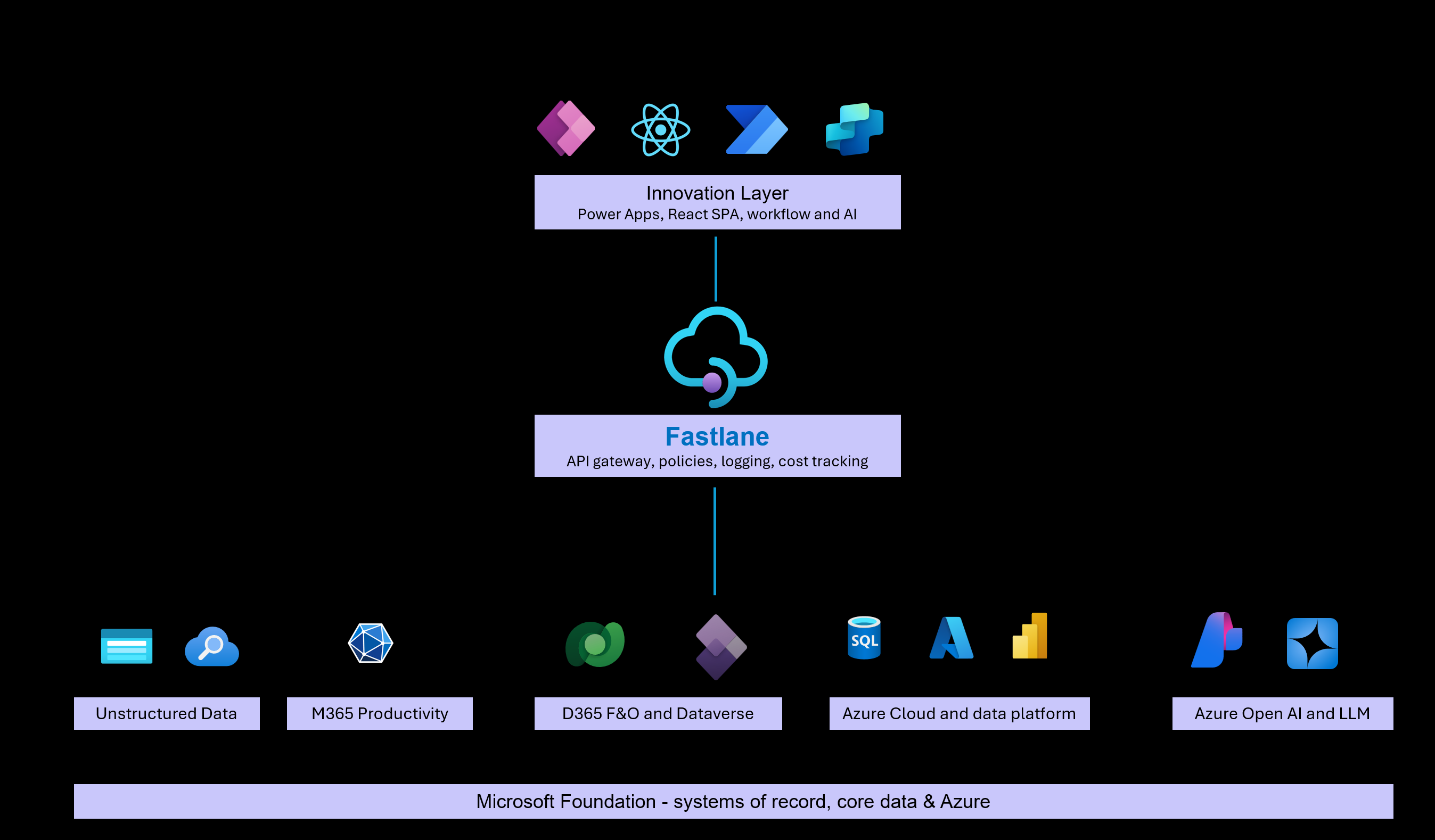
It includes 130+ productivity-boosting actions across the Microsoft ecosystem, including D365 F&O, D365 CRM, Azure Blob Storage, SQL Database, OpenAI, and more.
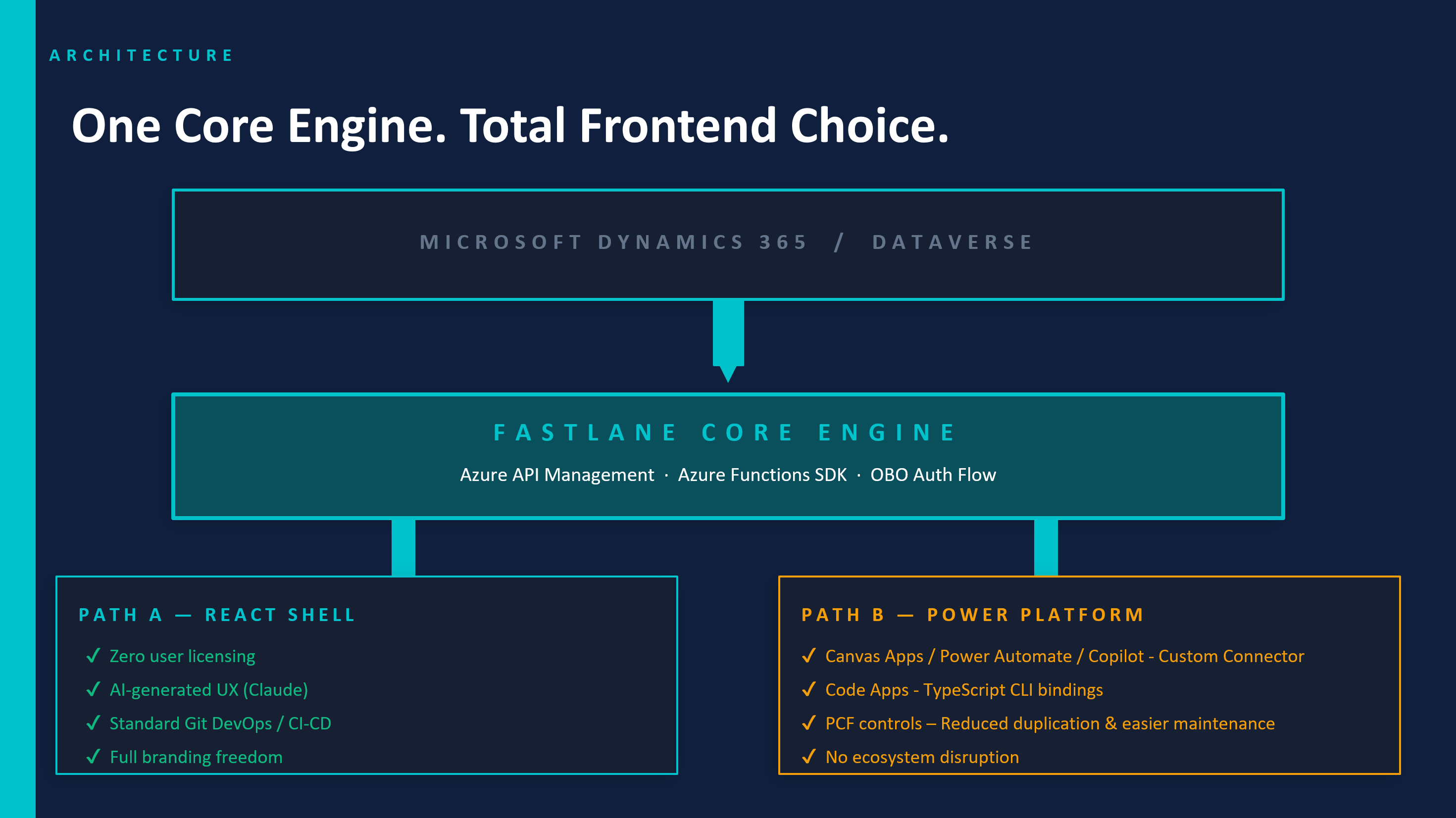
Integrations that once took months now take minutes.You can now connect your Power Apps or React front end to all your Microsoft enterprise data instantly, then build apps and automations in minutes.
Use case: Enhance D365 F&O with Power Apps
Implement D365 faster, better and cheaper than ever before.
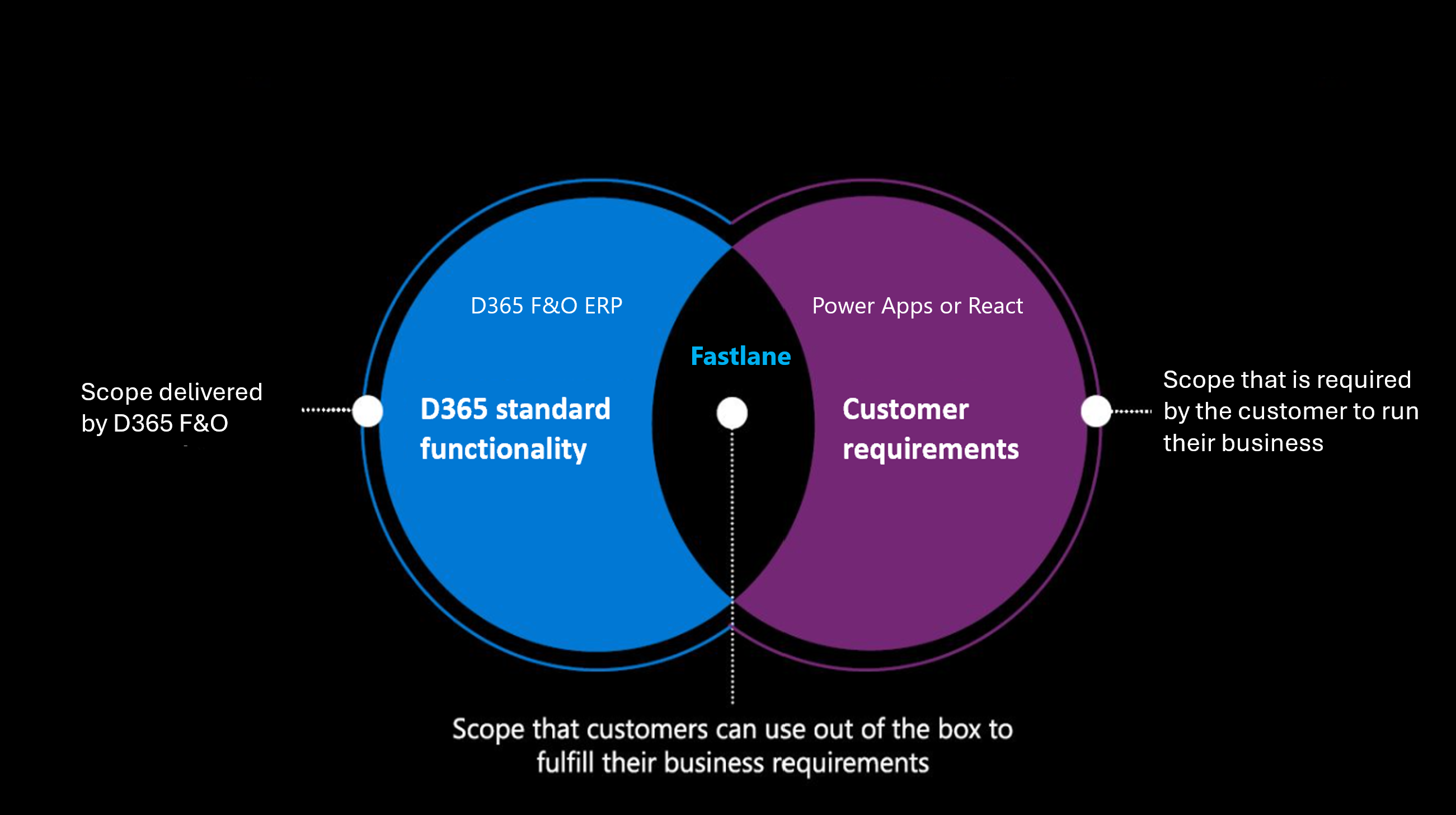
Customization is a critical part of every D365 implementation. Many organizations believe that closing functional gaps requires configuring complex standard features, buying costly ISV solutions, building heavy integrations, or customizing the D365 core with X++.
But there's a smarter way.
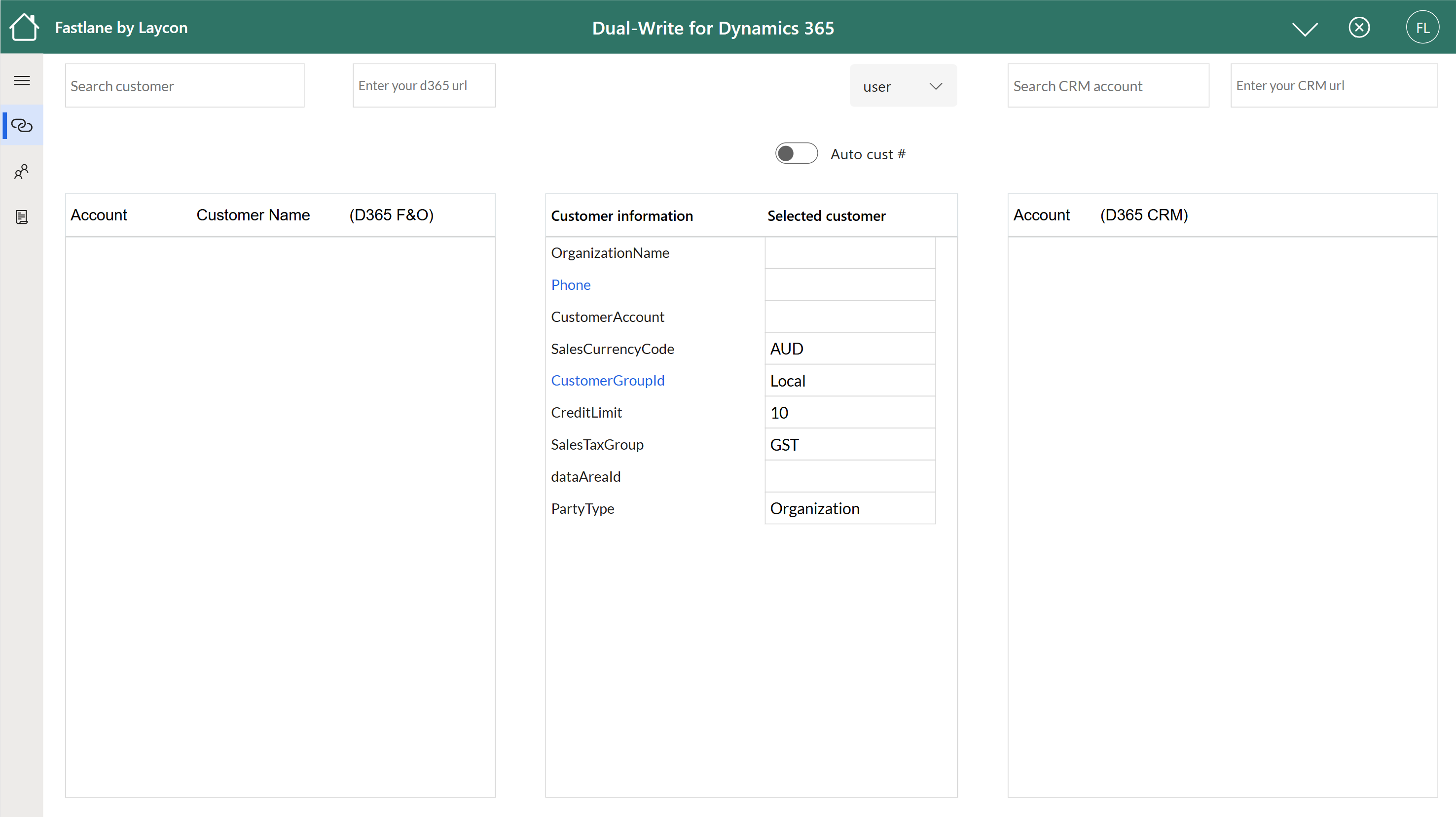
Extend Microsoft D365 with Power Apps to deliver tailored user experiences, streamline workflows, and bridge functional gaps, all without touching the core.
Power Apps empowers you to build custom solutions that are faster, better and easier, delivering innovation without touching the core or breaking the bank.
Stop waiting on developers and consultants. Start implementing D365 your way with Power Apps and Dynamics Connector.
Use case: Build Custom Software
What automations would you build right away for your business.
Your competitors are winning with custom software. Meanwhile, you're stuck in the software industrial complex, bloated vendors, failed consulting engagements, and price hikes that somehow deliver less every year.
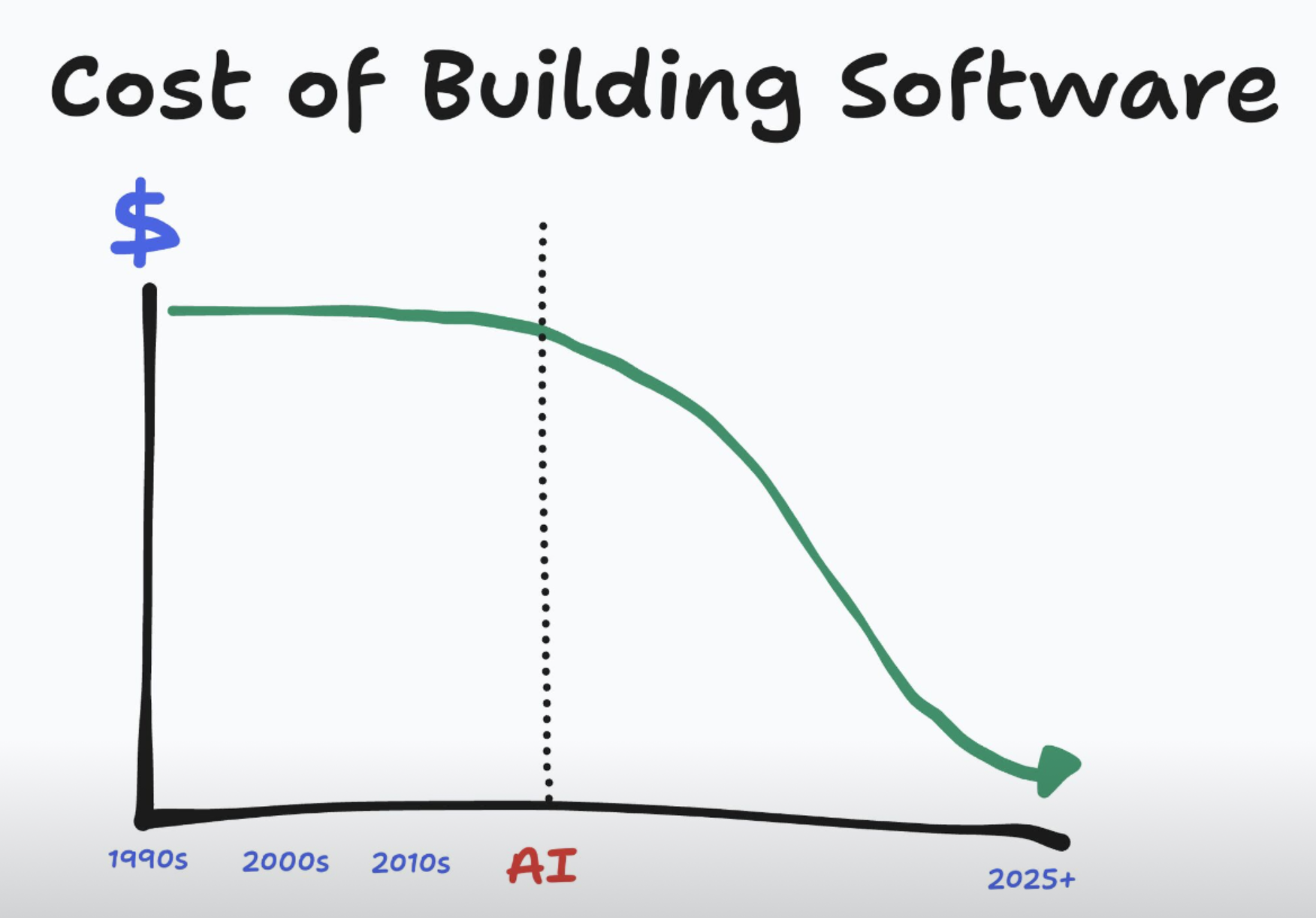
For years, the bottleneck in software wasn't ideas, it was execution. Custom builds were for the big boys. Creating your own tool meant hiring an agency, spending $300k, and waiting six months for something you weren't even sure would work.
That world is gone. Today, with AI and Power Apps, anyone can build custom software that fits their exact needs. This shift is changing how digital value is created and who gets to create it.
Teams used to be organized around the difficulty of building: PMs, engineers, designers, and analysts all working in separate lanes because they had to. You paid juniors to learn your business. But when code can be generated on demand, those lanes disappear and the old structures of work start to lose relevance.
Timelines have changed too. Software used to move through clear stages such as design, build, test, and release. Now those stages blur. An idea in the morning can be running by evening. The distance between idea and delivery gets smaller every day, and that collapse drives value creation. The next generation of software will be built by the knowledge workers closest to the problems.
Stop waiting on developers and consultants. Start building the tools you need to drive value for your business.
Use case: Power Apps for Finance
The pattern is the same for all finance teams: in an effort to move beyond the
limits of spreadsheets, finance leaders invest in the latest, supposedly transformative software.
It's expensive, and the promise is always the same, faster processes, cleaner data,
and a smooth 6-week implementation.
But the reality?
6 months later, after endless meetings with consultants. They are often still stuck in implementation, and when they finally turned it on,
the system is so clunky to use that they end up rebuilding everything in Excel just to make sense of the data.
It's one of the most common and most frustrating experiences in finance,
and for many teams, it becomes a turning point.
Now is the time leverage Dynamics Connector and Power Apps to build custom software that tackle business problems and drive value.
Imagnine you can build your own apps, tools and customize them to your needs. Faster to build than find one on the App Store.
Building your own App Store seems like a logical next step too. Please contact us to find out
Stop buying software and waiting for IT. Start building the tools you need to drive value for your business.
Why use Dynamics Connector over standard connectors?
Stop building connectors from scratch, we've done it for you
That's why we build Dynamics Connector
We've become experts at building, deploying, managing, and supporting Microsoft ecosystem API integrations at scale. We can help you build and deploy connectors that you manage yourself or host the infrastructure on your behalf. Whatever your needs, we have the knowledge and experience to make it happen.
Get started free today , connect in minutes !
IMPORTANT NOTE
Dynamics Connector works similarly to the standard Power Platform connector in terms of security. It provides only CRUD operations and data-transformation logic.
Dynamics Connector uses Microsoft Entra ID for authentication. This means it follows the same security model you already use across Microsoft services.
When users sign in with Entra ID, All API calls run using the user's own identity, and the backend system such as D365 enforces its normal security rules.
Example:
If a user doesn't have permission in D365 to create a customer record,
they won't be able to create one through an app that uses this connector.
The connector doesn't bypass or elevate user permissions.
Service Principal (SP) Authentication
For scenarios where apps need to run without user interaction, such as background jobs or automated workflows,
you can configure the connector to use a SP for authentication. This allows the app to authenticate as
a specific identity with predefined permissions.
The SP's App ID and secret are stored securely in your own Azure Key Vault (KV).
Users authenticate to KV using their own Entra ID at run time.
Again, It's your responsibility to control who can access and what to access.
In summary, Dynamics Connector provides a secure way to connect your apps to
Microsoft services the same as your existing security model. You remain in control
of data access and permissions at all times.